

Download Youtuber – download youtube videos, offline youtube, youtube downloader, video downloader, youtube video download
Overview
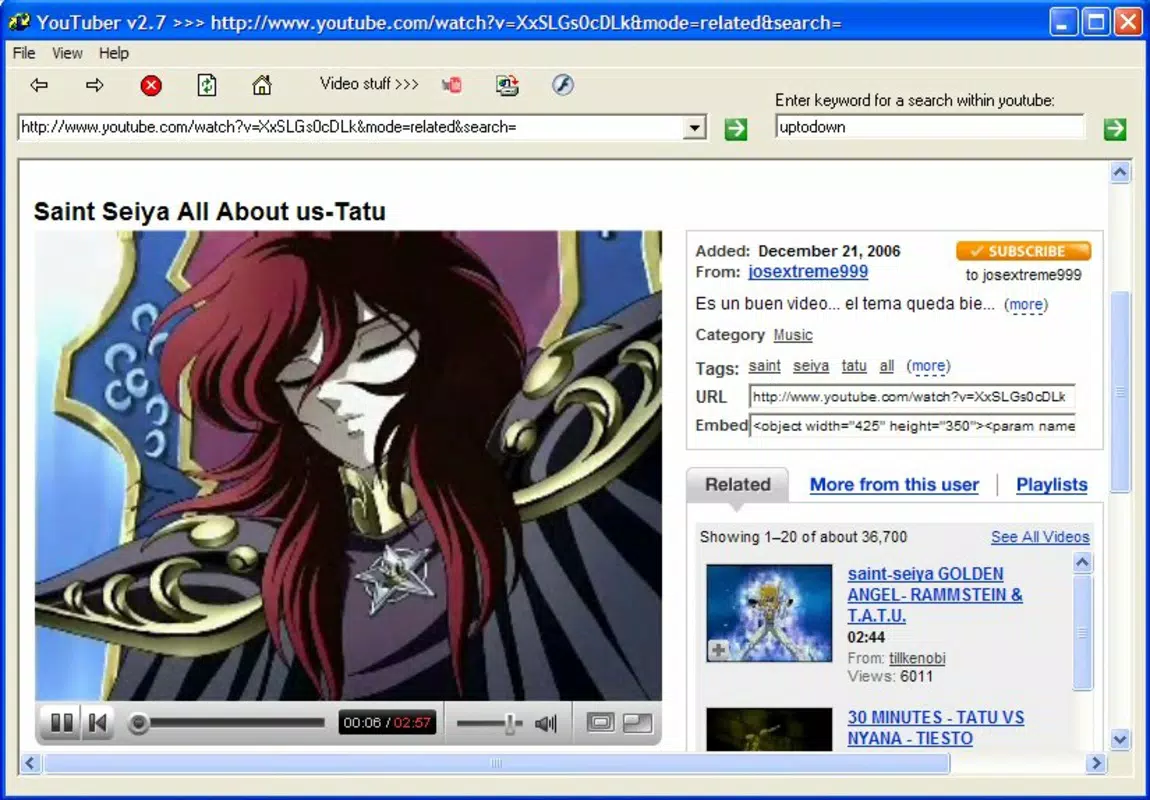
Youtuber is a mobile application designed to serve users who enjoy YouTube content but seek the flexibility of offline viewing. The app enables users to download videos directly from the YouTube platform and play them without an internet connection, offering a practical solution for those in areas with limited connectivity or during travel. Its core purpose is to bridge the gap between content consumption and accessibility, allowing users to save their favorite videos for later viewing. This makes it particularly useful for educational content, tutorials, music videos, and entertainment clips that users wish to revisit without relying on streaming.
Targeted at individuals who frequently consume YouTube videos and value convenience, Youtuber caters to a broad audience, including students, commuters, and digital content enthusiasts. While the developer is listed as "Youtuber," no additional information about the organization or its background is available. The app operates within the Android ecosystem and has been available since October 31, 2007, indicating a long-standing presence in the mobile utility space. Despite its age, it continues to fulfill a niche need in the app ecosystem: enabling offline access to YouTube content through a lightweight, focused tool.
Real-world use cases include watching tutorial videos during long commutes, reviewing educational content in remote locations, or enjoying music videos without data usage. The app’s minimalistic approach ensures it remains functional without excessive resource demands, making it a reliable utility for users seeking simplicity and functionality.
Key Features & Functionality
- Offline Playback: Users can download YouTube videos for offline viewing, eliminating the need for a continuous internet connection. This feature is ideal for travel, flights, or regions with unstable connectivity.
- User-Friendly Interface: The app features a straightforward layout that simplifies navigation. Finding and downloading videos requires minimal effort, with intuitive controls accessible even to non-technical users.
- Built-In Media Player: Youtuber includes a native media player capable of handling .flv files, ensuring seamless playback of downloaded content without requiring third-party apps.
- Quick Download Process: With a single tap, users can initiate downloads. The app handles the technical aspects, allowing for efficient and fast retrieval of video content from YouTube.
- Wide Compatibility: Videos are saved in .flv format, a widely supported file type, enabling playback on various devices and media players beyond the app itself.
For example, a student can download a series of lecture videos before heading to a rural area with no internet, ensuring uninterrupted study. Similarly, a traveler can save music videos or short films for entertainment during a long flight. The app’s focus on simplicity ensures that users can access and manage their content without technical barriers.
Interface, UX & Performance
Youtuber presents a clean and minimal interface, prioritizing functionality over visual complexity. The layout is designed to place key actions—such as video search and download—within immediate reach, reducing the number of steps required to complete a task. Navigation is linear and predictable, with a consistent structure that supports ease of use across different user profiles.
Although the developer did not list formal performance metrics, the app’s lightweight size of 1.2 MB suggests optimized resource usage. It is likely to run efficiently on older Android devices, maintaining responsiveness even under low-memory conditions. The built-in media player is designed to handle .flv files without lag, ensuring smooth playback during offline sessions.
Stability appears to be a key focus, given the app’s long availability since 2007. While no user reports or crash statistics are provided, the sustained presence on the platform implies a degree of reliability. However, the lack of recent updates or modern design elements may affect the user experience on newer Android versions.
Platform Compatibility & Technical Requirements
Youtuber is available exclusively on the Android platform. The current version is 2.0, and the app has a file size of 1.2 MB, indicating a lightweight footprint. The developer did not specify minimum OS requirements, nor did they list compatibility with specific Android versions or device categories.
Given the app’s release date in 2007, it may have been originally designed for early Android systems. Users on modern Android devices may encounter compatibility issues, especially if the app relies on deprecated APIs or lacks support for newer security protocols. However, the app’s continued availability suggests it may still function on many current devices, albeit with potential limitations.
Pros and Cons
Pros
- Enables offline viewing of YouTube videos without requiring a subscription or premium account.
- Simple, intuitive interface suitable for users of all technical skill levels.
- Lightweight size (1.2 MB) ensures minimal storage usage.
- Supports .flv format, which is compatible with many media players.
- Free to download and use with no in-app purchases or hidden fees.
Cons
- App has not been updated since 2007, raising concerns about compatibility with modern Android systems.
- No official support for iOS or other platforms.
- Limited information on technical requirements or device compatibility.
- May not support high-resolution video downloads or newer YouTube video formats.
- Security and privacy policies were not disclosed by the developer.
FAQ
Is Youtuber safe to use?
While the app is free and widely used, the developer did not provide information on security practices or data collection. Users should exercise caution when downloading content from third-party sources.
Can I download videos in high quality?
The app saves videos in .flv format, but specific resolution details were not provided. Quality may depend on the source video and the app’s download capabilities.
Does Youtuber support iOS devices?
No, the app is only available for Android devices. There is no official version for iOS or other platforms.
How do I update Youtuber?
As of now, the latest version is 2.0, released in 2007. The developer has not released any updates since then, so no update mechanism is currently available.
Can I use Youtuber without an internet connection?
Yes, once videos are downloaded, they can be played offline. However, an internet connection is required to initially search for and download videos.
Final Thoughts
Youtuber remains a notable example of a long-standing utility app that addresses a persistent user need: offline access to YouTube content. Its minimal design, straightforward functionality, and free availability make it a compelling choice for users seeking a no-frills video downloader. While its age raises concerns about modern compatibility and security, the app’s core features continue to serve a dedicated user base.
It is best suited for individuals with older Android devices or those who prioritize simplicity over advanced features. For users needing reliable offline viewing without data costs, Youtuber offers a functional, lightweight solution. Despite its limitations, its enduring presence in the app market speaks to its enduring value.
Download Youtuber now


